Jev, cloud, OpenRouter
NeuroFlash log search
Describe a symptom in the find bar and Jev, a decision model on OpenRouter, finds the matching lines in your log. It points to evidence, not causes: it writes no explanation and does not run in the background.
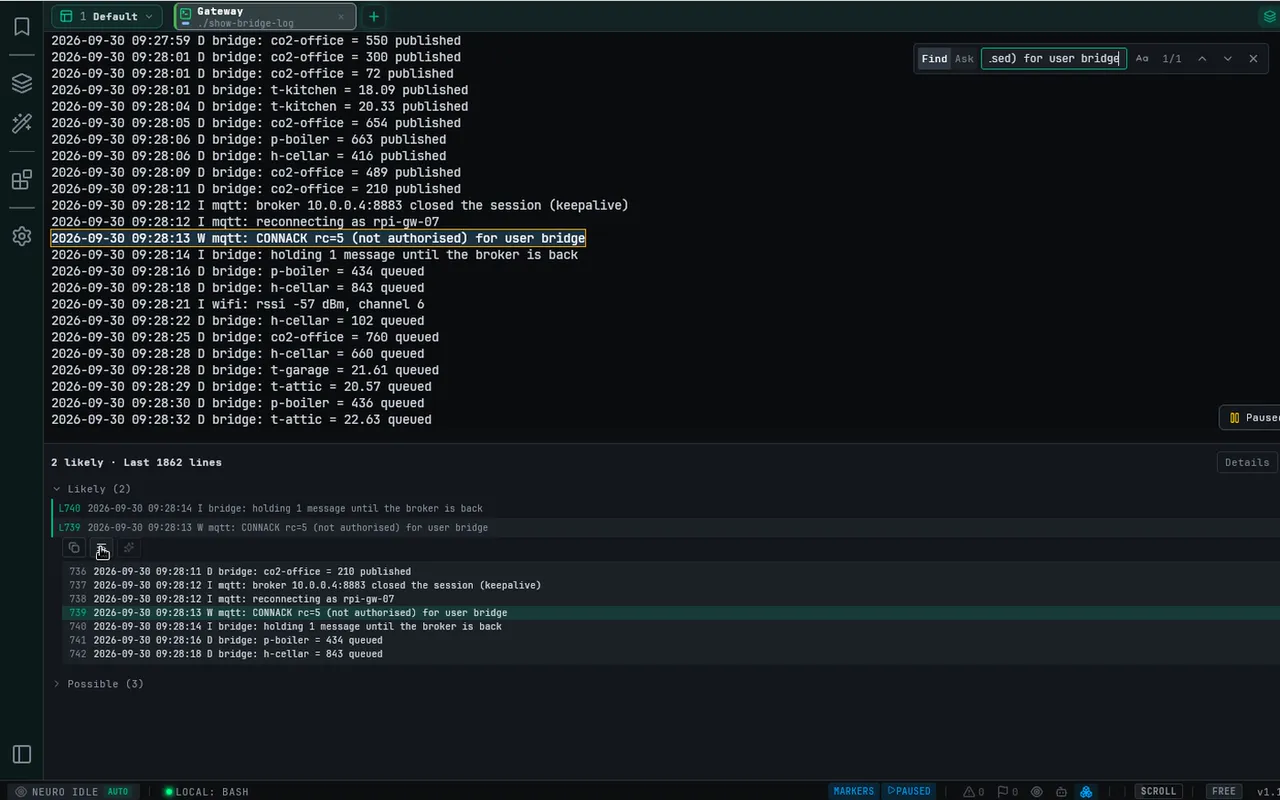
Search
- Add your OpenRouter API key in Cloud AI settings.
- Press Ctrl+Shift+F to open the find bar and switch it to Ask. A Find with no results also offers Ask ↗, and Neuro Tools → NeuroFlash log search… opens the same bar.
- Describe the symptom, for example “network error?”. Ask searches your selection if you have one, otherwise the newest 2,000 lines of the terminal. You can also choose a log file of up to 2 MiB and 20,000 lines.
- Check the estimate on the chip, then press Enter (⏎) to send. Text carried over from Find is not sent by a stray Enter: edit it, or click ⏎, to send it.
- Read the matching lines. Each row is one piece of evidence, such as “L11 Internet: Disconnected”, grouped as Likely or Possible and narrowed to a single line where it can be. The selected row shows 3 lines either side. Find in terminal hands that text to the normal find; Copy takes it with you.
Read the result honestly
A likely match is a place to inspect, not proof of a cause. No match does not mean your log is healthy. Partial results show which parts were not searched; review them before drawing conclusions.
Optional AI analysis is a separate action after searching. Review its model and context before invoking it; cloud-model prompts and context are sent to that provider. AI tool runs have their own Neuro usage rules.
Costs, cancellation and failures
The estimate is not an invoice cap or a fixed per-search price. Details separates actual, estimated and unresolved usage. A pending amount may not yet be fully accounted for.
Cancelling before you press Enter sends nothing. Cancelling after sending can still incur charges for requests already submitted. A failed search may also have billable submitted requests. Check the API key, connection or another running search before using Try again; a retry may add cost.